clacky

আপডেট

Mac অ্যাপের প্রতিটি ভার্সনে নতুন কী এসেছে। Clacky নিজেই নিজেকে আপডেট করে; এখনই সর্বশেষটি পেতে এর মেনু খুলে বেছে নিন আপডেটের জন্য দেখুন…।

প্রতিটি ভার্সনের রিলিজ নোট ইংরেজিতে।

পরেরটার খবর পান

নতুন কিছু এলে একটি ইমেইল পান। আর কিছু না।

অথবা আপনার রিডারে ফিড ফলো করুন।

v2.5সর্বশেষ

Demo Studio

Stop recording and your video edits itself: pauses cut, zooms on your clicks, captions, and a 9:16 for Shorts. Plus your own shortcuts, a heads-up before your disk fills, and Boop answers in the app.

  • নতুন

    Demo Studio (beta). Stop a recording and press Edit in Studio: the pauses are cut, every click gets a zoom, captions light up word by word, and one switch makes it 9:16, 1:1 or 4:5. Export MP4, HEVC, MOV, a GIF or just the audio, then share it with AirDrop, Messages or any app. It all happens on your Mac. Needs macOS 15.

  • নতুন

    Your own shortcuts. Settings → Shortcuts lists every Clacky shortcut in one place: click one and press the keys you want, and Clacky tells you if they clash with another shortcut.

  • নতুন

    Low on space. Turn it on in Mac Health and Boop chimes before your Mac runs out of room, with a Clean up… link to Storage.

  • নতুন

    Ask Boop in the app. Ask Boop a question in Boop Support and get the steps, with a Do it for me button when he can flip the setting for you.

  • নতুন

    Scrolling Capture (beta). Capture a whole web page or chat, taller than your screen, as one image: Clacky scrolls it for you (or you scroll) and stitches the parts together.

  • নতুন

    Meet your blip. Everyone gets their own little character with a name, a look you can reroll and a glow that grows as you use Clacky. It lives at the top of your dashboard and, if you like, beside the notch.

  • নতুন

    Achievements. 71 goals for your blip, from your first 100 clicks to a year-long streak. Each one gives glow, some give a badge, and the ones your Mac has already earned unlock straight away. Counts only, never which keys.

  • নতুন

    Share your blip. Make a card of your blip, your stats for the day, week, month or all time, or an achievement, in 1:1, 9:16 or 16:9. Share it or copy the image. Made on your Mac, nothing uploaded.

  • উন্নত

    A tidy home. The dashboard opens on your kit: the tools you picked, on top. Drag tools in from Explore, drag cards to reorder or out to remove, and press ⌘K to find any tool or ask Boop.

  • উন্নত

    Modes know the new tools. Modes can now switch the cursor style, Mac sound in recordings, opening Studio after a take, Mac Health alerts and your blip. Record and the new Present mode use them; modes you changed yourself stay as they are.

  • উন্নত

    Easier to install and activate. A friendlier install window, and if your licence key is on the clipboard, “I have a key” pastes and activates it in one click.

  • উন্নত

    Space you could free. The Mac Health tile shows how much space your last Storage scan found to free, instead of just Ready.

  • উন্নত

    What stats are sent. Settings shows the exact list of anonymous usage stats Clacky shares, and new installs are asked once in the welcome tour (Boop gets a cookie if you say yes).
v2.4.3

Copy the text from anything you can see.

  • নতুন

    Grab Text. Copy the text from anything on your screen, or from any screenshot or photo, with one shortcut. It all happens on your Mac.

v2.4.2

A crash fix, and two things that quietly didn’t work.

  • নতুন

    Pick your cursor. Record with a hand 👆, a big arrow, Boop’s paw 🐾 or no cursor at all, and change it later in Studio.

  • উন্নত

    When macOS blocks Clacky. If macOS isn’t letting Clacky hear your clicks, the dashboard now says so and shows the one switch that fixes it.

  • ঠিক করা হয়েছে

    A crash. Clacky no longer crashes when Voice to Prompt starts listening while your microphone is still switching on.

  • ঠিক করা হয়েছে

    Recordings that keep going. Recordings no longer stop on their own when your Mac is low on space or the mic drops. Only Stop ends a recording now.

  • ঠিক করা হয়েছে

    Screenshot from the menu bar. The Screenshot button in the menu bar menu opens its Area, Window and Full Screen choices again.

v2.4.1

Boop has something for you on your trial’s last day.

  • উন্নত

    A cookie from Boop. On the last day of your free week, Boop offers you his last cookie, with the end time and the prices on the card; say no and he eats it alone, and nothing is ever charged by itself.

v2.4

Screenshots that never get lost, and several of them on one canvas.

  • নতুন

    The Shelf. Every screenshot you take stays on a slim shelf beside the editor for 24 hours (the last 20, on this Mac only), ready to drag onto the canvas, into Finder or into any app.

  • নতুন

    Collage. Put several screenshots on one canvas, side by side, stacked, in a 2 × 2 grid, one big and two small, three in a row, as a Showcase or anywhere you like, then copy, save, share or send it to AI like any shot.

  • নতুন

    Nice or Raw. One switch gives a collage the Polish look (background, even gaps, rounded corners, a shadow per shot, sizes for X, Product Hunt and more) or leaves the shots edge to edge for docs and bug reports.

  • নতুন

    Shots that glue together. Match heights or widths in one tap: a shorter shot’s card extends in its own edge colour, sits centred or scales to fill, and dragged edges snap into line with a soft tick.

  • উন্নত

    Annotations follow their shot. Arrows, text and redactions stay on the shot they were drawn on when you change the layout, crop a shot or move it.

v2.3.2

A fix for switching headphones and speakers.

  • ঠিক করা হয়েছে

    Headphones and speakers. Clacky no longer quits when you plug in or switch headphones or speakers.

v2.3.1

Fixes for the screenshot editor.

  • ঠিক করা হয়েছে

    Send to AI and Share. In the screenshot editor, Send to AI opens its Claude and ChatGPT menu right under the button and Share opens its sheet over the editor, on any display, even when Clacky isn’t the app in front.

v2.3

Pro screenshots, a deeper Mac Health

One key turns any screenshot into a polished, framed shot sized for where it’s going, and Mac Health shows you what’s behind every reading.

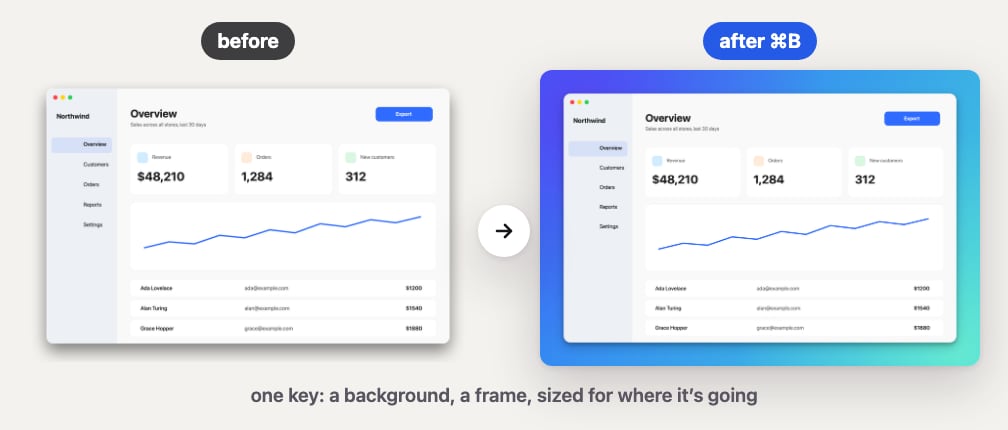
The same window before and after pressing Command-B: plain, then on a gradient with a shadow
Pro screenshots: press ⌘B and any shot gets a background, a frame and the right size.
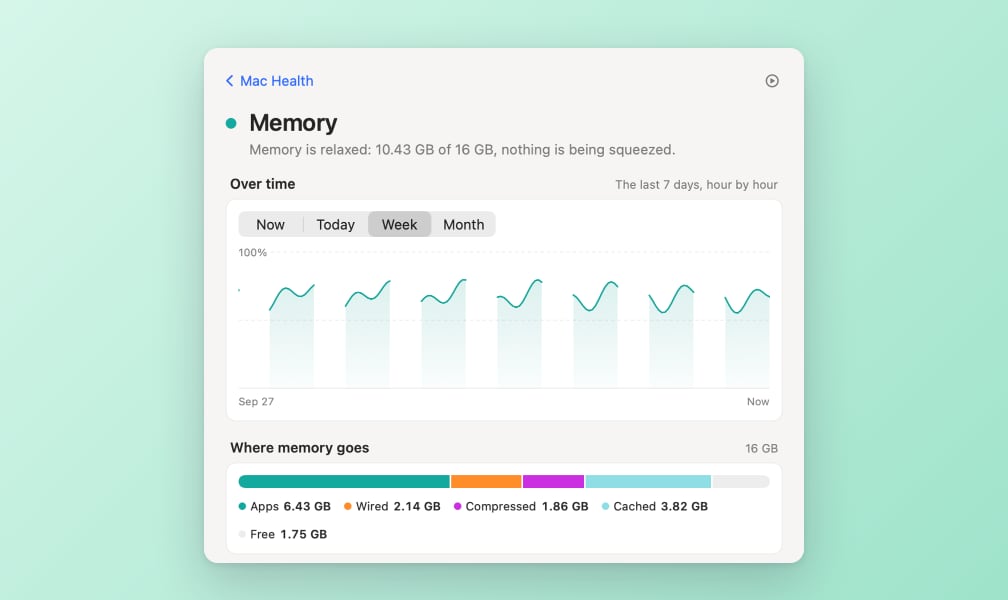
Mac Health memory page with a week chart and a bar showing where the memory goes
Mac Health: tap any reading for a chart and the apps behind it.
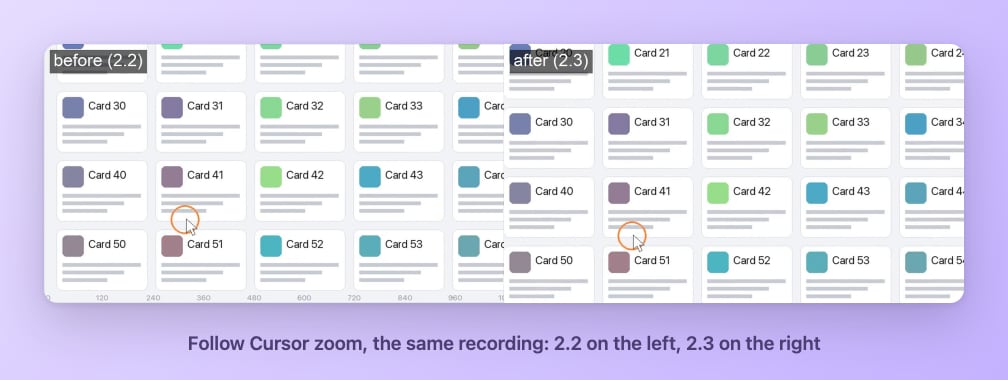
The same recording before and after, with the zoom following the cursor smoothly
Recorder: the zoom now follows your cursor smoothly.
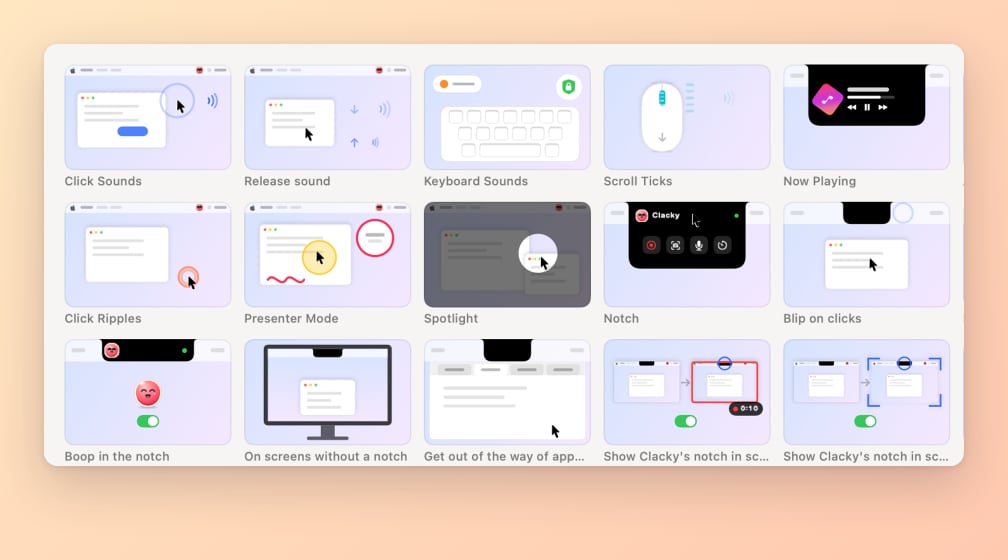
A grid of the short loops Clacky shows next to each feature
A short loop next to every feature shows what it does.
  • নতুন

    Polish your screenshots. Press ⌘B in the screenshot editor and your shot gets a background and sits centred, with 16 backgrounds to pick from, your own wallpaper included.

  • নতুন

    Frames and sizes. Put your shot in a window or browser frame and size it for X, Product Hunt, YouTube, Instagram, 9:16 or the App Store, then save the look as a preset.

  • নতুন

    Copy a polished shot. ⌥⇧⌘6 captures an area or a window and puts a polished version straight on your clipboard.

  • নতুন

    Detail pages in Mac Health. Tap any reading for a page with a chart for now, today, the week or the month, and the apps behind it.

  • নতুন

    App cards. Tap an app to see what it’s using, with Quit and Force Quit buttons that always ask first.

  • নতুন

    30-day history, if you want it. Turn it on and Mac Health keeps about 3 MB of history on your Mac only, and you can forget it anytime.

  • নতুন

    Three new gentle alerts. Mac Health can let you know when an app’s memory keeps creeping up, an app hammers your disk, or something drains your battery.

  • নতুন

    Projects. Dev servers you left running show up under Projects, so you can spot the idle ones and stop them.

  • নতুন

    Loops for every new feature. Each new feature has its own short loop that shows what it does.

  • উন্নত

    Your original stays safe. Saving an edit never overwrites the original screenshot, and Redact covers secrets with a solid block that can’t be undone.

  • উন্নত

    A lighter Mac Health window. The Mac Health window updates only the parts that change, so it uses less CPU while it’s open.

  • উন্নত

    Updates that wait for you. Clacky checks for updates every hour and installs them by itself when your Mac is idle (never while you’re recording, in a call or presenting); until then the menu shows “Update ready”.

  • উন্নত

    Smooth recorder zoom. On Clicks and Follow Cursor zoom moves smoothly and stays in sync with the pointer.

v2.2.1

Recording fixes

Stopping a recording always shows you the result, and the area box behaves when you move it.

  • ঠিক করা হয়েছে

    The preview always appears. When you stop a recording, its preview shows up bottom-right on the screen you recorded, with a “Recording saved · Show in Finder” card if the preview can’t open.

  • ঠিক করা হয়েছে

    Moving the area box. Dragging the area box moves it at the same size and stops at the screen edge, and you can resize it from its edges as well as its corners.

v2.2

Lighter, clearer, calmer

Mac Health uses a fraction of the CPU, every feature shows you what it does in a short loop, and a lot of small things work the way they should.

  • নতুন

    See what each feature does. A short loop next to every feature shows what it does; tap it to see it bigger.

  • নতুন

    Play while you think. Boop Support has a little game to play while you write to us.

  • উন্নত

    Mac Health is much lighter. With its window open, Mac Health went from about 51% CPU to about 2%, and Clacky uses less CPU when it sits idle.

  • উন্নত

    A much shorter menu. The menu bar menu is compact now, a lot less to scroll through.

  • উন্নত

    Clearer Input Monitoring step. The welcome tour shows macOS’s prompt first, and if you pressed Deny, one click helps you put it right.

  • উন্নত

    More notch choices. Hide Boop from the notch, and choose whether the notch shows up in your recordings and screenshots (off by default). On screens without a notch, it tucks away from app tabs.

  • উন্নত

    Drag the Mac Health side panel. Move the side panel wherever it suits you.

  • ঠিক করা হয়েছে

    Screenshot Studio. Send to AI works and tells you what happened, it works on a second display, and the toolbar is tidier.

  • ঠিক করা হয়েছে

    Color Picker. Fixed, with a clear Pick a Color button.

  • ঠিক করা হয়েছে

    Better crash reports. If Clacky crashes, the report now says what went wrong, so it gets fixed faster.

v2.1

Now Playing in your notch 🎵

See what Spotify or Apple Music is playing right in your notch, and play, pause or skip without leaving what you are doing.

  • নতুন

    Now Playing in the notch. Spotify and Apple Music show the cover, the song and play, pause and skip buttons in the open notch, with a progress bar you can drag; switch it on from its dashboard tile.

  • নতুন

    Other players too. For YouTube Music and other players in your browser, Clacky can send your keyboard’s play and skip keys, without the song’s name.

  • নতুন

    A mini player in the menu bar. If you like, the song’s name sits in the menu bar: click to play or pause, right-click to skip.

  • নতুন

    A card when the song changes. If you like, a small card with the cover and the name drops from the notch for a few seconds when a new song starts.

  • উন্নত

    Music in ⌘K. Play or pause, next and previous track are a ⌘K away.

v2.0

Not just clicks anymore.

Clacky becomes your companion on the Mac: one dashboard with every little tool you need, from captions to agent alerts.

  • নতুন

    Your dashboard. Every tool on one screen, grouped into Hear, Show & Record, Mac & Focus and Everyday, each with its own switch; ⌘K finds any tool or setting and ⌘/ shows every shortcut.

  • নতুন

    A new welcome tour. Pick what you want Clacky for and it switches on the tools that fit, explaining each permission before macOS asks, and only for the tools you use.

  • নতুন

    Modes. Record, Code, Focus, Call and Quiet each switch a whole set of tools in one click, from the notch, the menu bar or ⌘K, and you can edit them or make your own.

  • নতুন

    Captions and a teleprompter. After a recording Clacky writes captions on your Mac, in four styles to burn in or as subtitles to export, and the teleprompter reads your script just under the camera without ever showing in the video.

  • নতুন

    Screenshot studio. Capture an area, a window or the whole screen, then crop, blur, add arrows, text, numbered steps and a background frame (macOS 14 or later).

  • নতুন

    Mac Health. Memory, CPU, the busiest apps, battery health and what fills your disk, with a cleanup that shows you everything first and only moves files to the Trash.

  • নতুন

    Agent alerts. A sound and a gentle nudge when Claude Code or Codex finishes or needs you, set up in one click.

  • নতুন

    Voice to prompt. Hold ⌃⌥V and talk: your words are turned into text on your Mac and land on your clipboard, ready to paste into any app.

  • নতুন

    Clacky for your AI tools. Switch on MCP and Claude Code, Claude Desktop, Cursor or Codex can send you a notification, add a task, read Mac health or take a screenshot you approve, all on your Mac.

  • নতুন

    Focus and Keep Awake. A focus timer with soft ambient sounds, live in the notch, and Keep Awake for a set time, until your agent is done, or with the lid closed.

  • নতুন

    Everyday tools. Window snapping, clipboard history (off until you turn it on), a text expander, a colour picker, notes and today’s tasks, an app uninstaller and a tidier menu bar.

  • নতুন

    Boop Support. Questions, bugs and ideas go straight to Justinas from inside the app, and his replies show up right there.

  • উন্নত

    Plans, and a thank-you. New Macs get 7 days of everything with no card, then a monthly, yearly or lifetime plan, and everyone who bought Clacky before 2.0 keeps every tool and update, forever.

v1.5

A 7-day free trial, GIF export and Spotlight for your recordings, and Clacky moves itself to Applications.

  • নতুন

    Export as GIF. The recording preview has a GIF button: pick 480, 720 or 960 px wide and 10, 15 or 24 fps, and a looping, silent GIF is saved next to the video, ready to copy.

  • নতুন

    Spotlight in recordings. Turn on Spotlight in the recorder bar and everything but a soft circle around the pointer dims while you record, in the video too; set how dark and how big in Settings.

  • নতুন

    A 7-day free trial. Every feature is free for 7 days from the first launch, once per Mac, with no email and no card; a Mac that never had a trial gets its 7 days with this update.

  • উন্নত

    Boop asks to be fed. Clacky Lite is gone: without a licence Clacky stays quiet, and a friendly window with a hungry Boop offers Buy ($4.99 once, 2 Macs, every update) or a place to paste your key.

  • উন্নত

    Picking a sound family. Tapping a family in Settings → Sound or Keyboard now switches to its first sound and plays it, and the sound in use is easier to spot.

  • উন্নত

    Move to Applications. If Clacky runs from outside Applications it offers, once, to move itself there and reopen, so Launch at Login works after a restart; Settings shows the same button.

v1.4

Keyboard sounds: every key you press gets a sound too, and what you type is never recorded.

  • নতুন

    Keyboard sounds. Clacky now plays a sound for every key you press, from creamy thock to a typewriter with a bell on Return: 29 sounds in 9 families, with deeper space, return and delete keys, their own volume and a sound per app; it’s on after the update (Keyboard Sounds in the menu turns it off), and Clacky only knows the kind of key you pressed, never which one, so it never records, stores or sends what you type.

  • নতুন

    Boards. One tap in Settings → Keyboard gives your clicks and scrolling the sounds that match your keyboard family, so the whole desk sounds like one setup.

  • নতুন

    Typing stats. Settings → Stats → Typing shows your keys per minute, best minute, typing streak and the hours you type most, counted on your Mac from timing alone.

  • নতুন

    Find my sound. Five one-tap questions suggest a whole setup (keyboard sound, matching clicks and scrolling, volumes) with a fun archetype you can apply, retake or share as an image; your answers stay on your Mac.

  • নতুন

    Typing combos. Turn them on and a fast, steady rhythm earns a soft chime that climbs a note at a time.

  • উন্নত

    Anonymous usage stats. Clacky now shares anonymous usage stats (which features and sounds are used, the app and macOS versions, daily counts) so we can see what to improve: no personal data, never what you type, and you can turn it off in Settings.

v1.3

Clacky speaks your language: 13 languages, following your Mac.

  • নতুন

    Clacky in your language. The menu, Settings, welcome tour, recorder, camera bubble and licence screens now follow your Mac’s language: Spanish, French, German, Portuguese (Brazil), Italian, Dutch, Japanese, Korean, Chinese (Simplified and Traditional), Hindi, Bengali and Tamil, in the same words System Settings uses. Sound names stay as they are.

v1.2.1

Pick your camera from live previews, and Clacky starts in Lite until you buy.

  • নতুন

    Camera picker with live previews. The recorder’s Camera button shows a live thumbnail of every camera, so you can see which is which, with shape, size, border and mirror right there.

  • উন্নত

    Clacky now starts in Lite until you buy. New Macs start in Clacky Lite with the Crisp sound, and $4.99 once unlocks everything; a free trial you already started runs to its end.

v1.2

Your camera in a bubble on your screen recordings.

  • নতুন

    Camera bubble. Turn on the camera in the recorder bar and you appear in a circle, rounded square or rectangle that you can drag, resize and ring in white or Boop yellow, recorded live with your clicks.

v1.1.3

Updates install themselves, What’s New shows everything you missed, and a round of fixes for clicks and recordings.

  • উন্নত

    Automatic updates. Clacky now downloads updates in the background and installs them when it quits, and checks every 6 hours.

  • উন্নত

    Everything you missed. Skipped a few updates? What’s New now shows every change since your last version in one window.

  • ঠিক করা হয়েছে

    Clicks. The first click after resuming is instant again, and drag sounds stop properly on calls and survive switching to AirPods.

  • ঠিক করা হয়েছে

    Recordings. The preview shows the right shape and click count straight away, and renaming, trashing, cancelling exports and restarting a countdown no longer trip each other up.

v1.1.2

A small fix for the app icon.

  • ঠিক করা হয়েছে

    App icon. The app icon and menu-bar icon always show Boop as intended.

v1.1.1

A free trial with no email, Clacky Lite after it, and one-click activation after buying.

  • নতুন

    Try before granting. The welcome tour has a click pad to hear Clacky before you grant Input Monitoring.

  • নতুন

    Trial time in the menu. The menu shows how much of the free trial is left.

  • নতুন

    Clacky Lite. After the trial, Clacky keeps playing one sound for clicks, and recordings get a small “Made with Clacky” watermark.

  • নতুন

    One-click activation. After buying, Open Clacky & activate on the thanks page activates your licence without copying the key.

  • নতুন

    Keep Clacky screen. At the end of the trial, a screen shows your own click stats and how to keep everything.

  • নতুন

    Occasional check-ins. Every so often (at most every 10 days) Boop asks for a quick review. Turn it off in Settings.

  • উন্নত

    No email for the trial. The 24-hour free trial starts on first launch, with no email and no card.

  • উন্নত

    Easier permission step. The Input Monitoring step shows which switch to turn on, notices by itself when it works, and helps if you get stuck.

  • উন্নত

    Settings look. The click pad panel is now a floating card.

v1.1

Record your screen with every click in it, nine new sounds, a free trial and a new look.

  • নতুন

    Built-in screen recorder. Menu → Record Screen… records the whole screen or an area with Clacky’s clicks and ripples in the video, on macOS 15 or later.

  • নতুন

    Make a clip. After a recording, Make a Clip saves a vertical 9:16 video for TikTok, Reels and Shorts that follows your clicks, and copies a caption.

  • নতুন

    Zoom. The recording preview can zoom your video in on each click or follow the cursor, shows it live, and saves it at full size with the sound untouched.

  • নতুন

    Recordings window. Recordings open in a preview that plays right away, with rename, share, Post to X and Save As MOV, MP4 or GIF, and menu → Recordings… lists them all.

  • নতুন

    Click shortcuts. Bind a mouse-button rhythm, like three quick right-clicks, to start or stop recording, switch Clacky on or off, or pick the next sound, never using the keyboard.

  • নতুন

    Five new sounds. Boop, Thock, Kalimba, Typebar and Pixel join the library.

  • নতুন

    Spooky sounds. A new Spooky family (Pumpkin, Cauldron, Bones and Ghost) takes the library to 37 sounds in 8 families.

  • নতুন

    Free 24-hour trial. Try every sound and ripple in every app for a day before you buy, once per Mac.

  • নতুন

    What’s New. After an update, Clacky shows what changed once, and the menu’s What’s New… shows it again.

  • নতুন

    Boop on your desktop. Turn on Settings → Boop for a little Boop on your desktop that bounces with your clicks, dozes off when you take a break and wears a REC hat while Clacky records.

  • নতুন

    Share your stats. Settings → Stats → Share… makes a card of your week or all time, portrait or landscape, to copy, save or share.

  • নতুন

    Recording stats. A Recording tab shows time recorded, clicks on camera and which apps you recorded, by name only.

  • উন্নত

    Deeper click stats. Stats now show when you click, your top apps, records, your year so far and a streak of days with 50 or more clicks.

  • উন্নত

    Lighter and faster. Clacky now idles at about 0% CPU (was about 4%), uses less memory and loads only the sounds you use, while every click still plays instantly.

  • উন্নত

    Ripples on dark screens. Each ripple now has a light rim around its dark edge, so it shows on dark apps and in screen recordings.

  • উন্নত

    Bolder Recording preset. The Recording preset now draws a bold line, so clicks stand out in videos.

  • উন্নত

    Meet Boop. A new app icon and a matching menu-bar icon: Boop, a happy button mid-click.

v1.0.1

A smoother first setup.

  • উন্নত

    Clearer permission hint. The little panel beside System Settings now says to click Quit & Reopen if macOS offers it.

  • ঠিক করা হয়েছে

    Tour picks up where you left off. If macOS quits Clacky while you turn on Input Monitoring, the welcome tour now carries on when Clacky reopens.

v1.0

The first release of Clacky.

  • নতুন

    Click sounds. A press and release sound for every mouse and trackpad click in every app, from 28 sounds in 7 families.

  • নতুন

    Scroll ticks. A soft tick for every notch of the scroll wheel, in 8 styles.

  • নতুন

    Click ripple. A ring, double ring, glow or dot under the cursor on every click, in any size and colour, that shows up in screen recordings.

  • নতুন

    Presets. Default, Recording, Quiet, Playful and Subtle set the sound and the ripple in one tap.

  • নতুন

    Extra moments. Optional sounds for double-clicks, long presses and drags, and stereo that follows the pointer.

  • নতুন

    Your own sounds. Drop in your own press, release and scroll recordings.

  • নতুন

    Quiet when it matters. Keep quiet in the apps you pick and while any app uses the microphone.

  • নতুন

    Click stats. Your clicks per day, counted on your Mac only.