Remove filler words
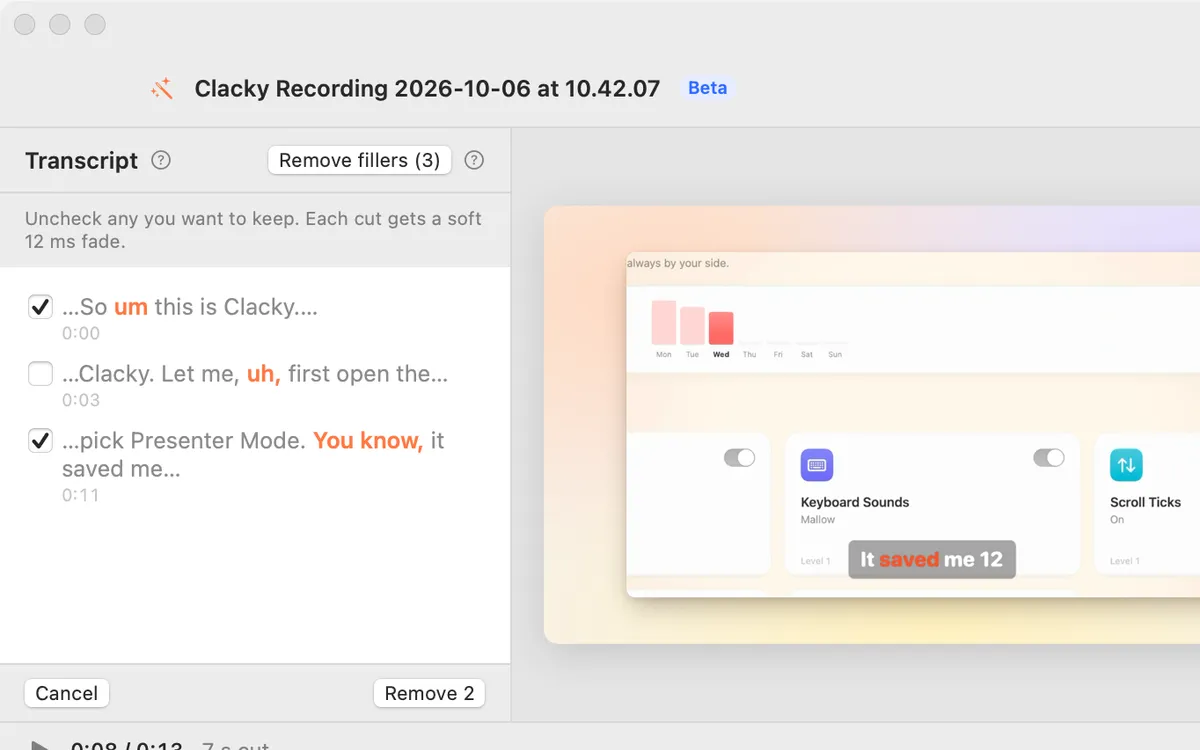
Every um, uh and “you know”, found in the transcript. Uncheck the ones to keep, then remove the rest in one go.
What it is
Studio looks through your transcript for filler words: um, uh, hmm and phrases like “you know” and “I mean”. You get a list to check before anything is cut.
Uncheck any you want to keep, then remove the rest at once. Each cut gets a soft fade, and one Undo brings them all back. Real words like “like” or “so” are only picked when they sit alone between pauses.
How to use it
Transcribe first
Open your recording in Studio. In the Edit by transcript section, click Transcribe if there is no transcript yet.
Review the fillers
In the Remove fillers row, click Review to see every one Studio found.
Keep the ones you want
Uncheck any filler you’d rather leave in.
Remove them
Click Remove. They are all cut in one go, and one ⌘Z brings them back.
Questions
- Does it work in other languages?
- Yes. Um and uh are found in every language, and Studio also knows filler words in Spanish, German, French, Portuguese, Italian, Dutch, Japanese, Korean, Chinese, Hindi, Bengali and Tamil.
- Can I see what will be cut first?
- Yes. Nothing is cut until you click Remove, and you can uncheck any filler in the list.
Make something on your Mac today.
Seven days free, every feature, cancel anytime.