Now Playing
Spotify or Music in the notch: the song, its cover, play, pause and skip. A mini player in the menu bar too.
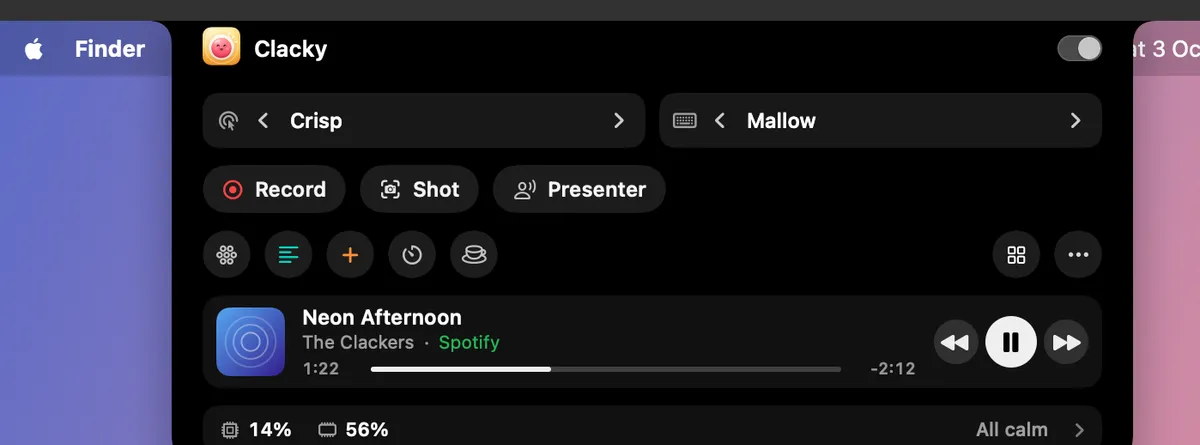
What it is
Now Playing shows the song playing in Spotify or Music in the notch, with its cover and the time. Play, pause and skip from there.
You can also have a mini player in the menu bar, and a small card that drops from the notch for a few seconds when the song changes.
Clacky listens for changes and never checks on a timer. Browser players like YouTube Music share no song info, but media keys let you play, pause and skip them.
How to use it
Turn it on
Add Now Playing to My Kit from Explore and switch it on, or go to Settings → Now Playing.
Play something
Play a song in Spotify or Music. It shows in the notch.
Allow control
The first press of play, pause or skip asks macOS once to let Clacky control that app. Say yes to get the cover, the time and the buttons.
Choose where it shows
In Settings → Now Playing, pick In the notch, Mini player in the menu bar and A card when the song changes.
Tips
- Play, pause and skip from ⌘K too.
- Turn on Other players (media keys) for YouTube Music and other browser players. It needs Accessibility to send the media keys.
Questions
- Which music apps does it work with?
- Spotify and Music show the song, cover and controls. Browser players like YouTube Music can be played, paused and skipped with media keys, without song info.
- It says Not allowed. What do I do?
- Turn on Clacky under that player in System Settings → Automation.
Make something on your Mac today.
Seven days free, every feature, cancel anytime.