 MacPip
Answer
Can Clacky play sounds only in my headphones?
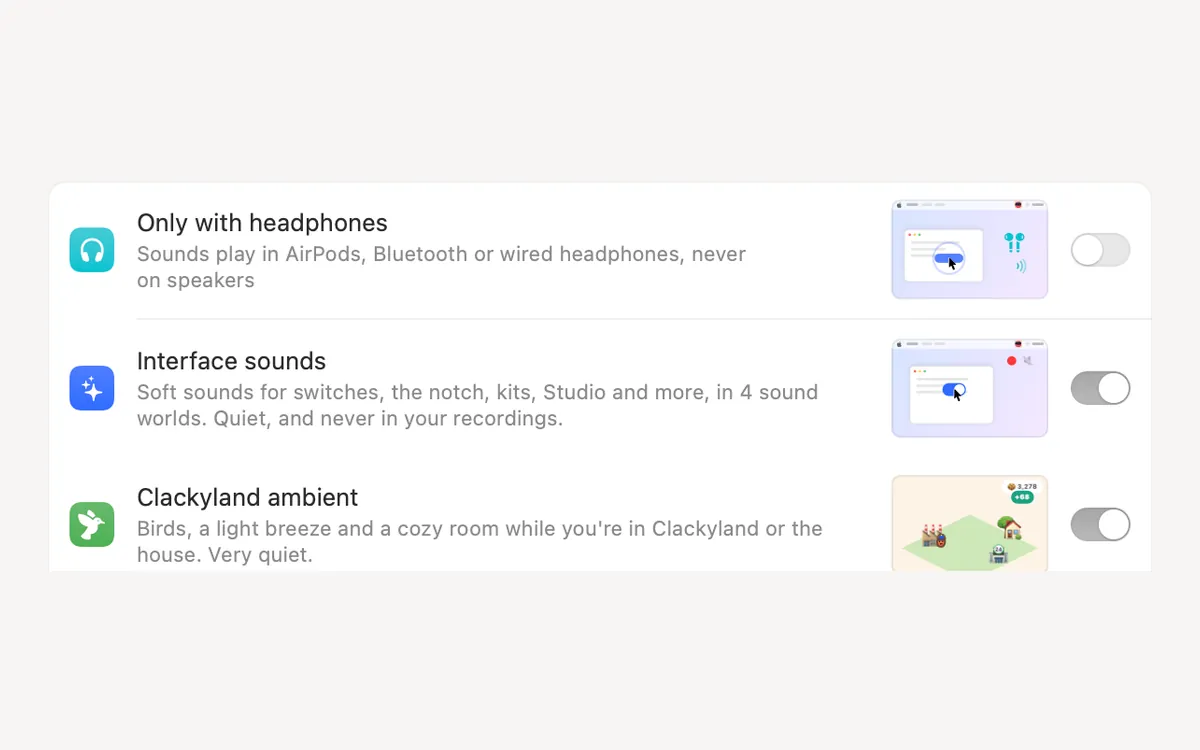
Yes. Turn on Only with headphones in Clacky's Settings → General, and Clacky plays its sounds in AirPods, Bluetooth or wired headphones and never on your Mac's speakers.
Take your headphones off and Clacky goes quiet by itself. Put them back on and the sounds come back, with no need to quit and reopen it.
How to turn it on
- Open Clacky's Settings and go to General.
- Under Sound, turn on Only with headphones.
- The line under it shows what Clacky hears now, for example "Now: AirPods Pro · sounds on" or "Now: MacBook Pro Speakers · quiet on speakers".
What counts as headphones
Clacky decides from the kind of connection and the device's name. If a Bluetooth speaker has an unusual name, it may be treated as headphones. In that case use the Output setting below instead.
| Output | With Only with headphones on |
|---|---|
| AirPods and other Bluetooth headphones | Sounds play |
| Wired headphones in the headphone jack | Sounds play |
| USB headsets named like headphones | Sounds play |
| MacBook or iMac speakers | Quiet |
| Bluetooth speakers named like a speaker, a HomePod, Sonos or a soundbar | Quiet |
Pick one exact device instead
Settings → Sounds → Output sends Clacky to one device you choose, while it is connected. The rest of your Mac can keep playing on the speakers. If the device is not connected, the list says "Chosen device (not connected)". Choose Follow system output to go back to normal.
AirPods going in and out
Since Clacky 2.7.15, Clacky follows AirPods when you take them out and put them back in, and keeps playing where it should. If you are on an older version, update from the menu (More → Check for Updates…).
Bluetooth headphones add a small delay to every sound, Clacky's included. If clicks feel late in headphones, see why keyboard sounds lag with Bluetooth headphones. We have not measured Clacky's delay in milliseconds.
Good for shared rooms
Only with headphones is the setting for offices, libraries, trains and late nights: you hear your clicks and typing, and the people around you don't. Pair it with Quiet during calls, which is on by default, so a call always starts silent.
Questions
Does Clacky work with AirPods?
Does the ripple still show with Only with headphones on?
Will my mic pick up Clacky in headphones?
Facts checked on 5 November 2026.
Related
- Sounds where you want themOnly with headphones, on the output you pick, or only in the apps you choose. Ripples still show everywhere.
- Can I change Clacky's volume without changing my Mac's volume?Yes. Clacky has its own volume slider in its menu and in Settings, plus a separate keyboard volume. Your Mac's volume and other apps stay as they are.
- Will people on my Zoom call hear Clacky's sounds?No, not by default. Quiet during calls keeps Clacky silent while Zoom, Meet, FaceTime, Teams or Discord uses your mic. The ripple shows on screen share.
- Why do keyboard sounds lag with Bluetooth headphones?Bluetooth audio adds a delay to every sound your Mac plays, so typing sounds arrive late. Play them through wired or built-in speakers to fix it.
- Keyboard sounds for focus and study on a MacDo typing sounds help you focus? How to use keyboard sounds on a Mac for study, writing and coding: soft sounds, headphones only, quiet during calls.
Make something on your Mac today.
3 days free, every feature. Then $4.99 once.