 MacPip
Answer
How do I zoom in on clicks in a screen recording?
You need an editor, because the Mac’s own recorder and QuickTime Player don’t zoom: either add each zoom by hand (in iMovie, with the Ken Burns crop on a short piece of the clip), or use a recorder that saves where you clicked and zooms there for you.
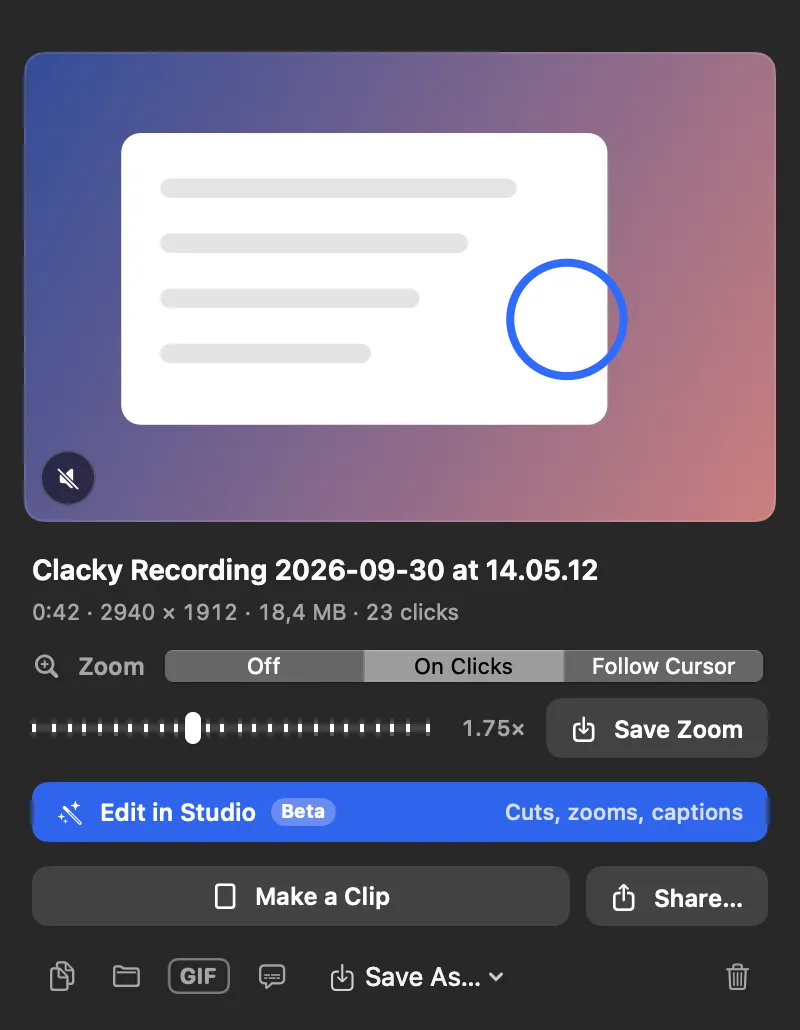
Clacky does the second on macOS 15 or later: after you stop, set Zoom to On Clicks in the preview, or let Studio’s Auto edit zoom in on every burst of clicks.
Zoom by hand in iMovie (free)
iMovie has no click zoom, but its crop tool can move from one frame to another over a clip.
- Add your recording to an iMovie project.
- Move the playhead to just before the click, choose Modify → Split Clip, then split again just after it.
- Select the short middle clip and click the Cropping button above the viewer.
- Choose Ken Burns, set the start frame to the whole screen and the end frame to the area around the click, then click Apply.
- Do the same on the next clip with the frames swapped, to zoom back out.
Zoom live while you record
macOS has a built-in screen zoom in System Settings → Accessibility → Zoom. Turn on its keyboard shortcuts and you can zoom in on the live screen while recording, so the zoom is in the video. It takes practice to do smoothly, and you can’t change it afterwards.
With Clacky: zooms from your real clicks
Clacky’s recorder saves where the pointer was and every click next to the video. That gives you three ways to zoom:
- In the preview: after you stop, pick Zoom → On Clicks (or Follow Cursor), set how far with the slider, and click Save Zoom. It writes a new “(zoom)” copy.
- Auto edit (Beta): click Edit in Studio and it zooms in on every burst of clicks, cuts the quiet between your sentences and speeds up the waiting. Click any cut to bring it back.
- By hand: in Studio press Z to add a zoom at the playhead or F for a block that follows the cursor, then drag its ends and set it from 1.25× to 3×.
Which way to pick
Clacky’s click zoom works on recordings made with Clacky, because it needs the saved clicks. For other auto-zoom recorders, see Clacky vs Screen Studio.
| Way | Price | Zooms where you clicked | Effort |
|---|---|---|---|
| iMovie Ken Burns | Free | Only where you set it | A few minutes per zoom |
| Accessibility Zoom | Free | Wherever you zoom live | Practice, no undo |
| Clacky | $4.99 once, 3-day trial | Yes, from the real clicks | One click, then fine-tune |
Where these facts come from
Checked on 5 November 2026.
Questions
Can Clacky zoom on a video I recorded with QuickTime?
Does zooming make the video blurry?
Can I show the clicks as well as zoom?
Facts checked on 5 November 2026.
Related
- Auto editStudio cuts the quiet between your sentences, zooms in on every burst of clicks and speeds up the waiting. Click a cut to bring it back.
- Clacky vs Screen StudioClacky vs Screen Studio for Mac: price (once or monthly), click sounds, a click ripple, auto zoom, captions and editing. A fair, sourced comparison.
- How do I show mouse clicks in a screen recording on Mac?Show mouse clicks in a Mac screen recording: Apple’s Show Mouse Clicks option, editors that add click effects later, and a live click ripple with a sound.
- Speed up part of a screen recordingQuickTime can’t. In iMovie, hold R to select the part, click Speed and choose Fast (2×, 4×, 8× or 20×). Clacky Studio sets 0.5× to 8× per clip.
- Product demo video on MacRecord a product demo with clicks heard and seen, let Studio cut the pauses and zoom on clicks, add captions, and export for X, YouTube or a launch.
- Free screen recorder for Mac that shows clicksYes. The Mac’s own recorder is free and can circle every click. OBS, Cap and Loom’s free plan are free too, but each shows clicks differently.
Make something on your Mac today.
3 days free, every feature. Then $4.99 once.