 MacPip
Answer
How do I speed up part of a screen recording on a Mac?
Use iMovie, which is free: hold R and drag across the slow part of the clip, click the Speed button above the viewer, choose Fast and pick 2×, 4×, 8× or 20×.
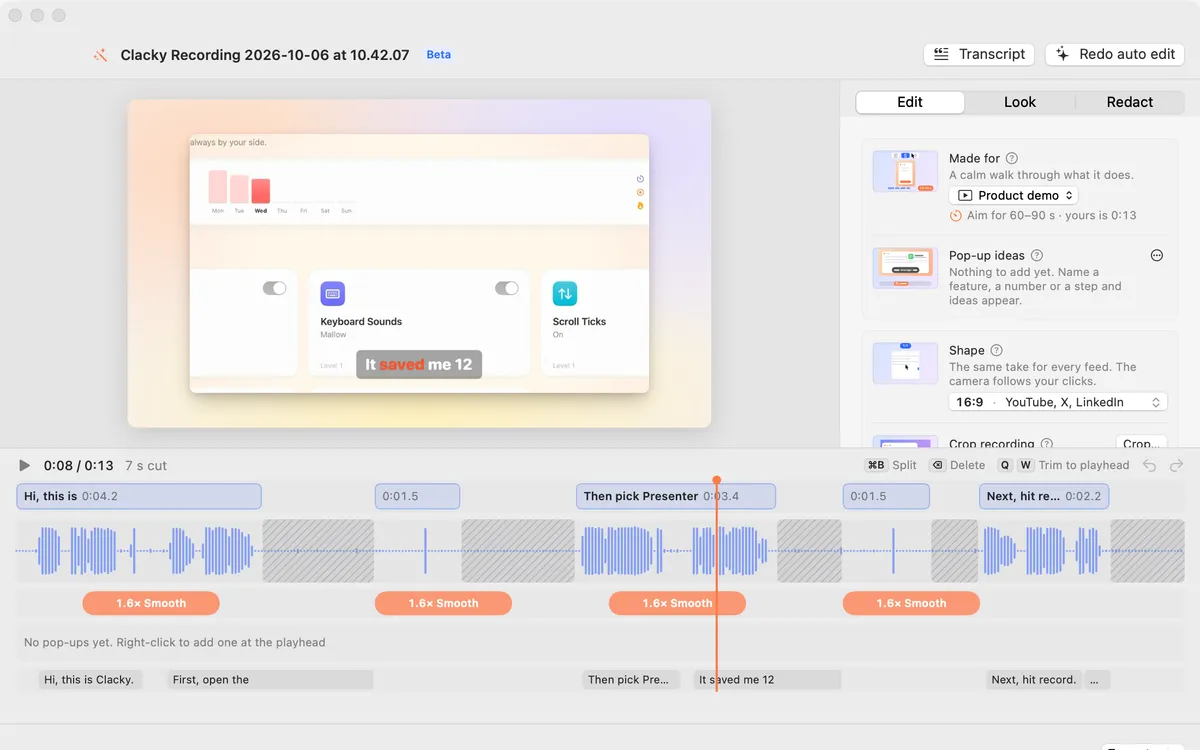
QuickTime Player can only play faster, not save a faster part. In Clacky Studio you split the clip and set its speed from 0.5× to 8×, or let Auto edit speed up the waiting for you.
Speed up a part in iMovie
- Create a project in iMovie and drag your recording into the timeline.
- Hold down R and drag across the part you want faster. It gets a yellow outline.
- Click the Speed button above the viewer.
- Choose Fast from the Speed menu, then click 2×, 4×, 8× or 20×. Choose Custom to type your own number.
- Tick Smooth for a gradual change, and Preserve Pitch if you talk in that part.
- Choose File → Share → File to export.
What to speed up in a screen recording
If the faster part has talking in it, cut it instead: speed makes voices hard to follow even with the pitch kept.
- Waiting for an app to install, a page to load or a build to finish.
- Typing long text the viewer doesn’t need to read.
- Moving windows around before the real step.
- Keep the steps that matter at normal speed, so people can follow the clicks.
With Clacky Studio
Open the recording with Edit in Studio (or any video with Edit a Video). On the Clips lane, press ⌘B at the start and end of the slow part, select the clip and pick a speed: 0.5×, 1×, 1.5×, 2×, 4× or 8×. The clip shows how long it plays now.
Sound is muted in a clip that plays faster or slower, so clicks don’t squeak. Auto edit (Beta) does the common case for you: it speeds up the waiting and cuts the quiet between sentences, and each change shows as a block you can click to undo.
Where these facts come from
Checked on 5 November 2026.
- Apple: Slow down and speed up clips in iMovie on Mac (hold R to select a range, Fast 2×, 4×, 8×, 20×, Custom, Smooth, Preserve Pitch)
- Apple: Trim a movie or clip in QuickTime Player
Questions
Can QuickTime Player speed up a video?
How do I make a timelapse of a long screen recording?
Will a sped-up part keep my click sounds?
Facts checked on 5 November 2026.
Related
- Trim a screen recording on a MacOpen it in QuickTime Player, choose Edit → Trim, drag the yellow handles and click Trim. To cut a part from the middle, split the clip first.
- Zoom in on clicks in a screen recordingmacOS can’t zoom on clicks by itself. Zoom by hand in iMovie with Ken Burns, or use a recorder that knows where you clicked, like Clacky.
- Clips and speedSplit, trim and delete clips on the Clips lane (⌘B, Q, W), and play any clip from 0.5× to 8×.
- Auto editStudio cuts the quiet between your sentences, zooms in on every burst of clicks and speeds up the waiting. Click a cut to bring it back.
- Product demo video on MacRecord a product demo with clicks heard and seen, let Studio cut the pauses and zoom on clicks, add captions, and export for X, YouTube or a launch.
Make something on your Mac today.
3 days free, every feature. Then $4.99 once.