Why your MacBook trackpad clicks without moving
Turn off a MacBook and press the trackpad. Nothing happens. No click, no give, just a slab of glass. Turn it on and the click is back. That surprised me the first time, and it's the key to every trackpad sound question.
I make Clacky, an app that plays sounds when you click, so I spend a lot of time thinking about what a click is. On a modern Mac trackpad it's a small piece of theatre: a sensor and a motor working together. Here's how it works, why tap to click makes no sound at all, and what you can change.

Justinas, maker of Clacky
7 min read
The short answer
Why does a MacBook trackpad click without moving?
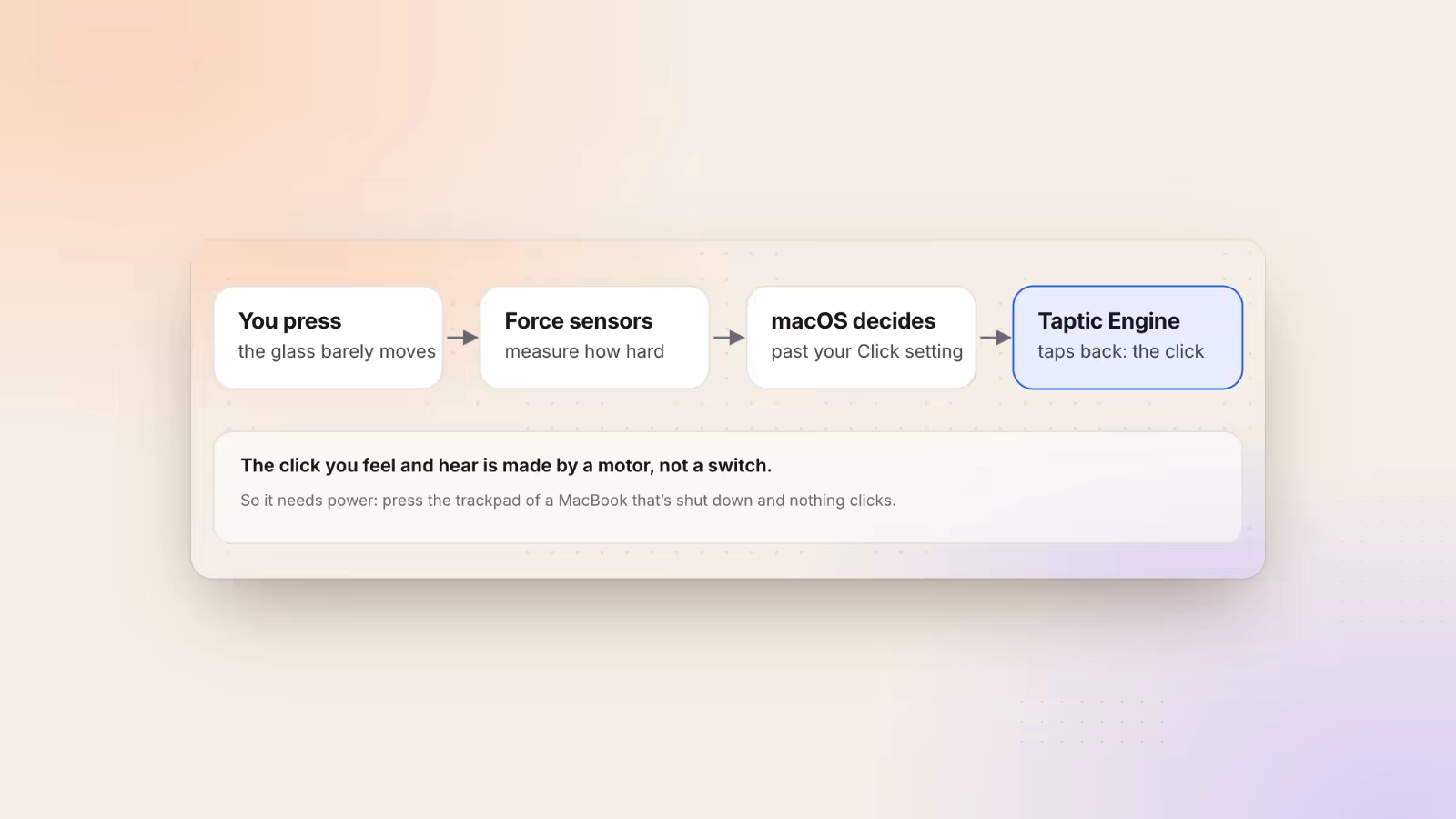
Modern MacBook trackpads are Force Touch trackpads. Force sensors measure how hard you press, and when it passes your Click setting, a small motor called the Taptic Engine taps the glass. That tap is the click you feel and hear. It needs power, which is why a switched-off MacBook doesn’t click.
How a Force Touch trackpad fakes a click
There’s no switch under the glass. There are sensors that measure pressure and a motor that answers.
Older MacBook trackpads really clicked. The pad sat on a hinge near the top, and pressing it pushed a small switch at the bottom. That's why you couldn't click near the top edge: there was no room to move.
In 2015 Apple replaced that with the Force Touch trackpad. When it launched, people were surprised to learn the glass doesn't really move. iFixit's teardown found force sensors near the corners and a set of electromagnets underneath, which Apple calls the Taptic Engine.
Here's the sequence. You press. The sensors measure how hard. When the force passes the threshold you picked in settings, macOS tells the Taptic Engine to give the glass a short sideways tap. Your finger reads that tap as a click, and the little sound you hear is the tap too.
Every MacBook Pro since 2015, every MacBook Air since 2018 and the Magic Trackpad since its second version work this way. Because it's all measured, you can click anywhere on the pad, top edge included. And because a motor makes the click, a Mac with no power has no click to give.
Why tap to click is silent
A tap never presses hard enough to reach the force sensors’ threshold, so the motor never fires.
With Tap to click on, a light touch counts as a click. The trackpad sees your finger land and lift quickly, and macOS sends a click. No force passes the threshold, so the Taptic Engine has nothing to answer. The click happens, silently.
That's why people who switch to tap to click describe the Mac as suddenly quiet, and why some of them miss the sound. You lose two kinds of feedback: the feel and the click. Your eyes have to confirm every click instead.
Taps are also much shorter than presses. A press holds the glass down for a moment while the motor fires; a tap is a quick touch and lift. Try both here and compare the numbers. Click with the trackpad, then tap, then try a mouse if you have one:
Try it: press and let go
0 ms
from press to release
Timed in this page with your browser’s own clock. Nothing is sent or stored.
The number is how long the click was held, from press to release, measured by your own browser. Nothing leaves the page.
Make trackpad clicks quieter, firmer or silent
Four switches in System Settings change how a trackpad click feels and sounds.
Open System Settings → Trackpad → Point & Click. As of macOS 27, Apple's guide lists these:
| Setting | What it changes |
|---|---|
| Click | Light, Medium or Firm: how hard you press before it clicks |
| Quiet Click | Turns off the click sound, keeps the click |
| Force Click and haptic feedback | The deeper second press, and haptics in some apps |
| Tap to click | A light tap clicks, with no haptic and no sound |
If clicks feel too loud in a quiet room, try Quiet Click first. If they feel too stiff, set Click to Light. Firm is harder to trigger by accident, which some people like when they rest a hand on the pad.
The names have changed a little between macOS versions, so on an older Mac look for the same ideas in the same panel. The trackpad itself is the same hardware; only the software decides what it does with your press.
If your trackpad doesn't click at all with the Mac on, restart first. A Taptic Engine that stays silent after a restart is a hardware question for Apple.
Give tap to click a sound
If you like tapping but miss the feedback, an app can play a sound on every click, taps included.
macOS doesn't have a setting for a tap sound. What it does is send the same two events for every click, whatever made it: a mouse down and a mouse up. A tap sends them too.
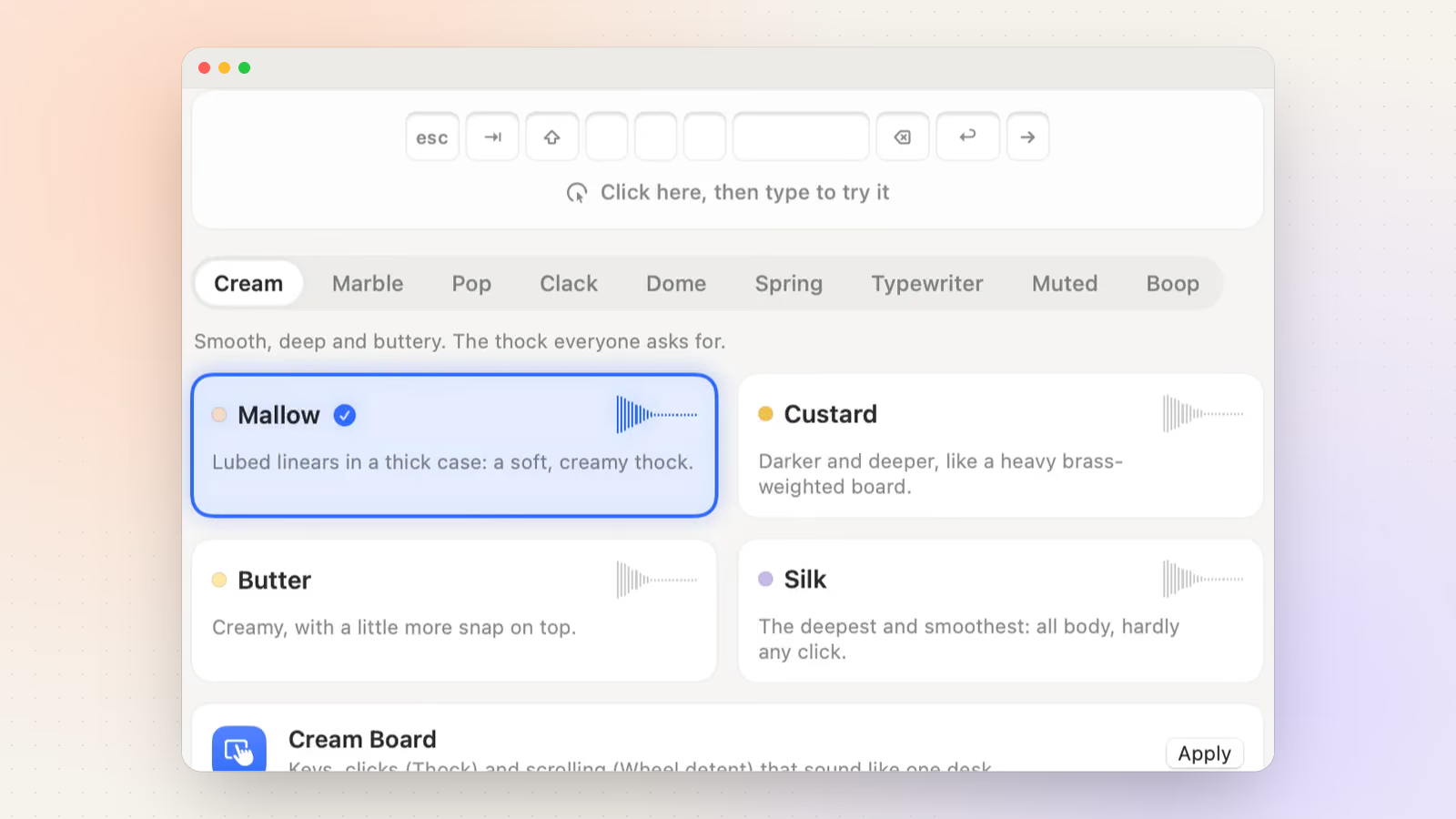
That's what Clacky listens for. It plays a sound on mouse down, and a second, softer release sound on mouse up, which is on by default and has a switch in the menu. So taps get a sound, presses get a sound, and a mouse gets the same. Clacky hears that a click happened and where the pointer was, which it uses to place the sound left or right, and nothing more. You can hear some of the click sounds here:
Try it: tap a pad to hear it
Clacky’s own sound engine, playing in your browser. Turn your sound on.
I'd suggest a short, soft sound if you tap a lot. A tap is fast, and a long sound starts to overlap itself. If you want to compare with other apps, I wrote a guide to Mac click sounds that covers the options.
Clacky is $4.99 once for one Mac, with a 3-day free trial in the app.
Clicking quietly in meetings and libraries
The trackpad’s own click and any click sound app are two different sounds, with two different off switches.

In a quiet room there can be two sounds coming from your trackpad, and they're switched off in different places.
- The trackpad's own click. That's the Taptic Engine. Turn on Quiet Click in Trackpad settings, or use tap to click, which never makes it.
- A click sound app. If you use one, it plays through your Mac's speakers. The Mac's volume and mute keys control it like any other sound.
Clacky has a switch for exactly this: Only with headphones. With it on, sounds play in AirPods or any headphones and never on the speakers, so you can keep your clicks in a library and nobody else hears them. Take the headphones out and the Mac goes quiet by itself.
If you're testing a trackpad or mouse that seems to miss clicks or double-click, the free mouse test at the bottom of this page counts every press and shows the time between clicks.
Change how your MacBook trackpad clicks
- Open the settings. Open System Settings → Trackpad → Point & Click.
- Set the pressure. Under Click, choose Light, Medium or Firm.
- Turn off the click sound. Switch on Quiet Click to keep the click but lose the sound.
- Or click by tapping. Switch on Tap to click. Taps make no haptic and no sound.
Test your trackpad or mouse
Open it on its own pageA free mouse and trackpad test: every button, the scroll and the time between clicks light up as they happen, so a missed or extra click shows. Nothing leaves the page.
The tool loads here as you scroll. You can also open it on its own page.
Nothing you do in it is uploaded or saved.
Questions
Why doesn’t my MacBook trackpad click when the Mac is off?
The click is made by the Taptic Engine, a small motor under the glass, and it needs power. With the Mac shut down there’s nothing to make the click, so the glass feels solid. That’s normal.
Can I turn off the trackpad click sound but keep clicking?
Yes. On macOS 27, switch on Quiet Click in System Settings → Trackpad → Point & Click. Or use Tap to click, which never makes a sound.
Is the trackpad click sound coming from the speakers?
No. It’s the Taptic Engine tapping the glass, so the sound comes from the trackpad itself. That’s why muting the Mac doesn’t silence it.
Why can I click anywhere on a new MacBook trackpad?
Force sensors measure pressure across the whole pad, so there’s no hinge. Older trackpads clicked with a real switch and a hinge at the top, so the top edge was hard to click.
Does Clacky play a sound for tap to click?
Yes. A tap sends the same mouse down and mouse up as a press, and Clacky plays a press sound and an optional release sound for both.
Written by Justinas Rolando
I make Clacky and build it in public. I write about what I learn making a small Mac app. More about me on the about page, and a free newsletter at justinasrolando.com.