Freeze Guard
Fizz warns you before your Mac freezes, with one-click fixes.
What it is
Freeze Guard keeps an eye on memory, busy apps and apps that stop responding, using the readings Mac Health already takes.
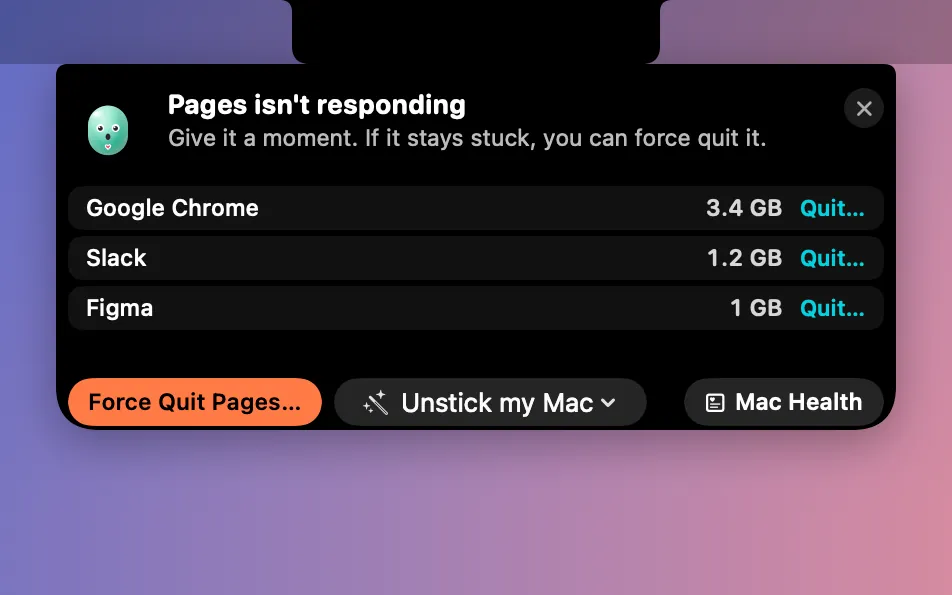
When your Mac starts to struggle, Fizz drops a card from the notch before it freezes: what’s wrong, and the top 3 apps to blame.
It never quits anything on its own. Quit a stuck app (Clacky asks first), or use Unstick my Mac to fix screenshots, restart the Dock or Finder, or quit hidden duplicate apps.
How to use it
Turn it on
Add Freeze Guard to My Kit from Explore and flip it on, or open Mac Health and turn on Warn me before my Mac freezes.
Keep working
While it’s on, Freeze Guard checks every 10 seconds.
Act on a card
When a card drops from the notch, quit one of the apps it names (Clacky asks first), or leave it.
Unstick your Mac
Screenshots stuck, or the Dock or Finder not answering? Pick a fix under Unstick my Mac in Mac Health.
Tips
- Unstick my Mac works with Freeze Guard off too; nothing runs until you pick one.
Questions
- Will it quit my apps by itself?
- No. Nothing happens unless you click, and quitting an app always asks first.
- Will its cards show up in my recordings?
- No. Freeze Guard’s cards are never captured.
Make something on your Mac today.
Seven days free, every feature, cancel anytime.