Clacky stays out of the video
The recorder bar, countdown, pill and Clacky’s windows are left out of your recordings. Demo Mode puts them in.
What it is
The recorder bar, the countdown, the recording pill, the notch, the camera picker and Clacky’s windows are visible to you but left out of your recordings. The video shows only your screen, your clicks’ ripples and your camera bubble.
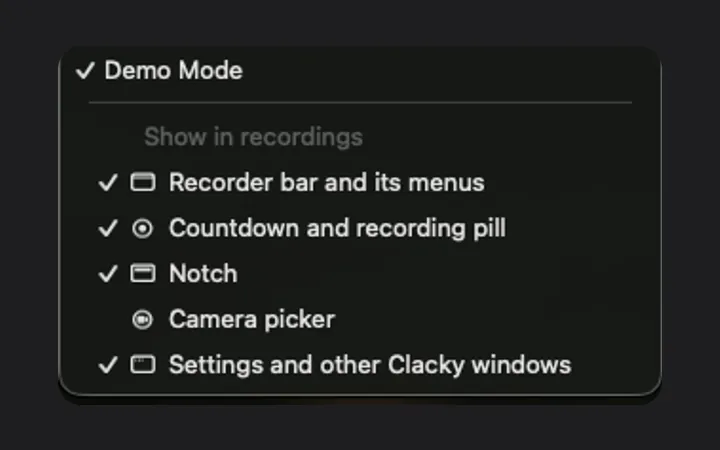
Making a video about Clacky itself? Turn on Demo Mode and those controls are in the video. You can turn each one off on its own.
How to use it
Nothing to do by default
Record as usual: Clacky’s own controls stay out of the video.
Turn on Demo Mode
In Settings → Recorder, or in the Clacky menu under More → Demo Mode.
Pick what shows
Under Show in recordings, choose the recorder bar, the countdown and pill, the notch, the camera picker or Clacky’s windows.
Questions
- Are the ripples left out too?
- No. Ripples are meant for the viewer, so they are always in the video, as is the camera bubble.
- What about the Teleprompter?
- The Teleprompter is never in recordings, screenshots or screen shares, Demo Mode or not.
Make something on your Mac today.
Seven days free, every feature, cancel anytime.