StudioLive
Stop from the notch
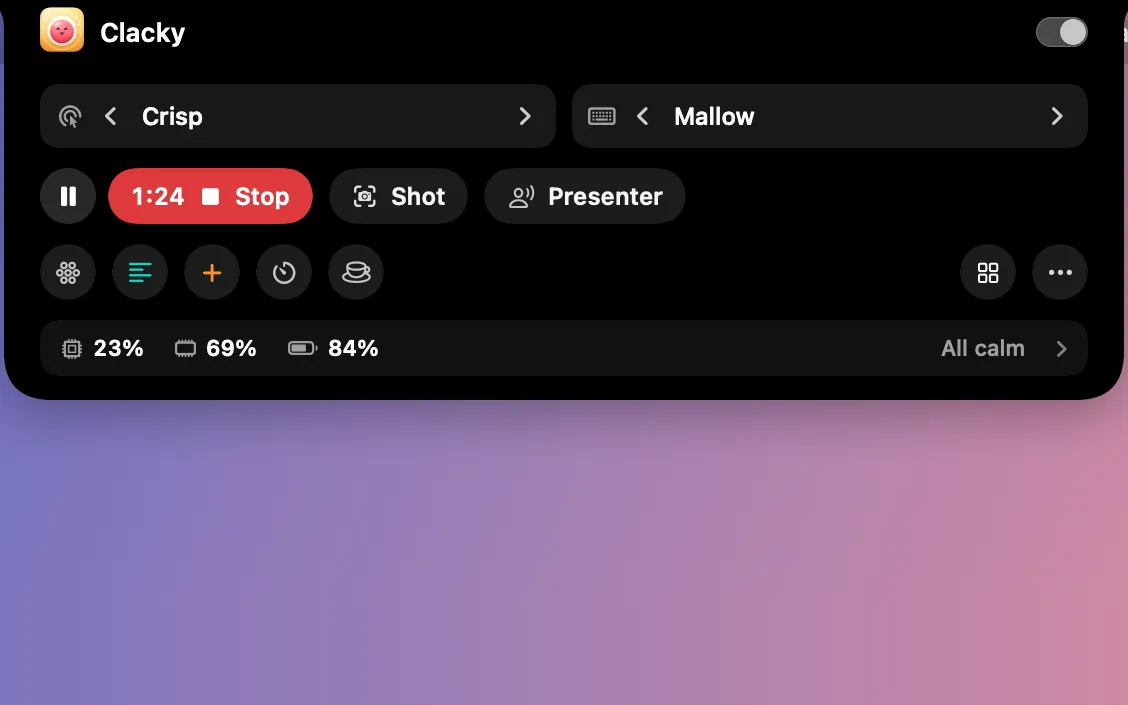
While you record, the notch shows a red dot and the time, with Pause and Stop beside it. They never show up in the video.
What it is
While you record, the notch widens to show a red dot and the time on one side, with Pause and Stop on the other. Click Stop and the recording is saved and opens straight away.
The controls are for you only: they never show up in the video. On a Mac without a notch, Clacky can draw one at the top of the screen.
How to use it
Start a recording
In Studio, click Record, then Record in the recorder bar.
Look at the notch
A red dot and the time show beside the notch, with Pause and Stop next to them.
Stop
Click Stop. The recording is saved and its preview opens.
Questions
- Will the notch be in my video?
- No. Clacky’s notch is left out of recordings unless you turn on Show Clacky’s notch in screen recordings.
- My Mac has no notch. Can I still use it?
- Yes. Turn on the drawn notch (On screens without a notch) in the Notch settings.
Make something on your Mac today.
Seven days free, every feature, cancel anytime.