 MacPip
Answer
Clacky vs Snick: which scroll sound app for Mac?
Pick Snick if you only want scroll sounds, with trackpad haptics that tap in time on a Force Touch trackpad and clicks spaced by how fast you scroll. Pick Clacky if you want scroll ticks plus click and keyboard sounds, a ripple on every click and a screen recorder in one app, from macOS 13.
Snick is a one-time purchase with free updates, and its page doesn’t show the price. Clacky is $4.99 once for 1 Mac, after 3 days free with no card.
Clacky and Snick side by side
From Snick’s own site and Clacky’s pages, read on 5 November 2026.
| Clacky | Snick | Ahead | |
|---|---|---|---|
| Scroll sounds | 8 styles, plus Match click | 7 voices | Same |
| Scroll feel settings | Density, Trackpad amount, Speed pitch | Spaces clicks by scroll speed | Taste |
| Click and keyboard sounds | 37 click, 29 keyboard | Not on its page | Clacky |
| Ripple, recorder, screenshots | Yes | Not on its page | Clacky |
| macOS | 13 or later | 14 or later | Clacky |
| Permission | Input Monitoring | Accessibility | Same idea |
| Price | $4.99 once, trial | One-time, price not on its page | Clacky for clarity |
Pick Snick if…
Snick is built around one thing. Its seven voices are Nok (a crisp detent), Vyl (a vinyl tick), Glu (a gooey pop), Dib (a tight blip), Plo (a low plop), Tok (a wooden tok) and Rub (a rubber snap). It reads how fast you scroll, so slow scrolling clicks one by one and a long fling blurs together, and on a Force Touch trackpad each click comes with a haptic tap. Sounds work on any Mac, haptics need the Force Touch trackpad. It runs on Apple silicon and Intel and updates itself through Sparkle.
- You only want scroll sounds, and haptics on the trackpad matter to you.
- You want a tiny menu-bar app that does one thing.
Pick Clacky if…
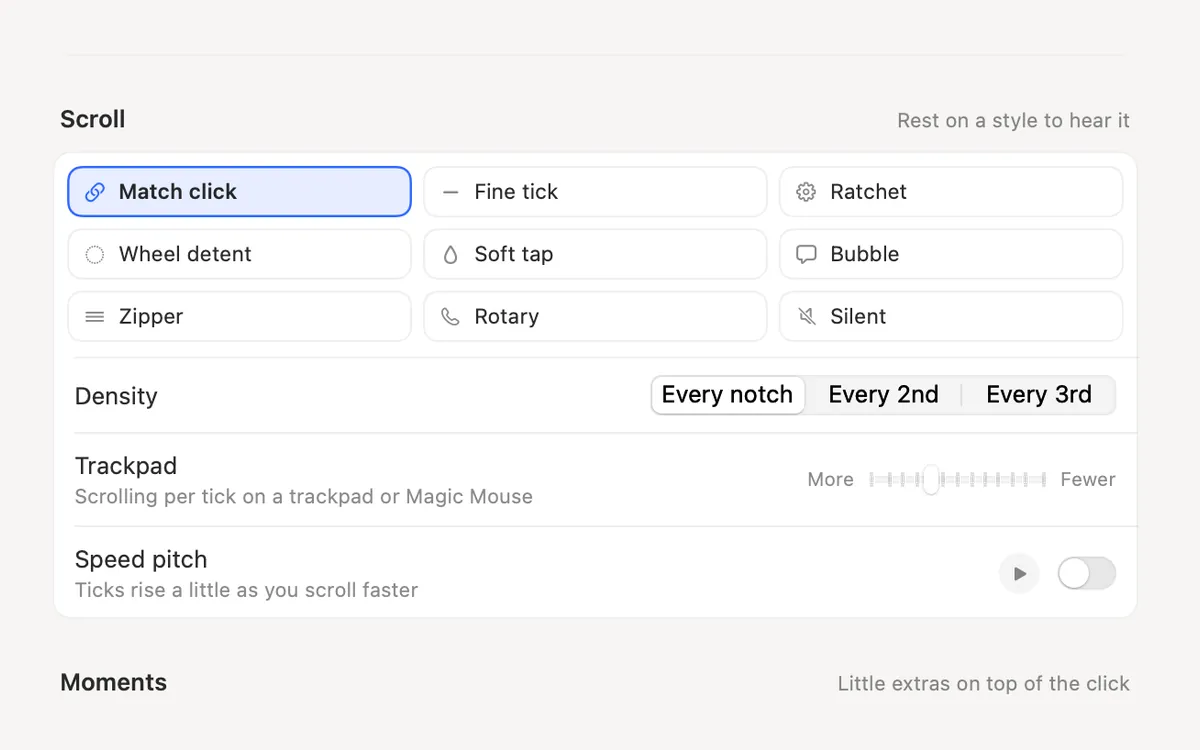
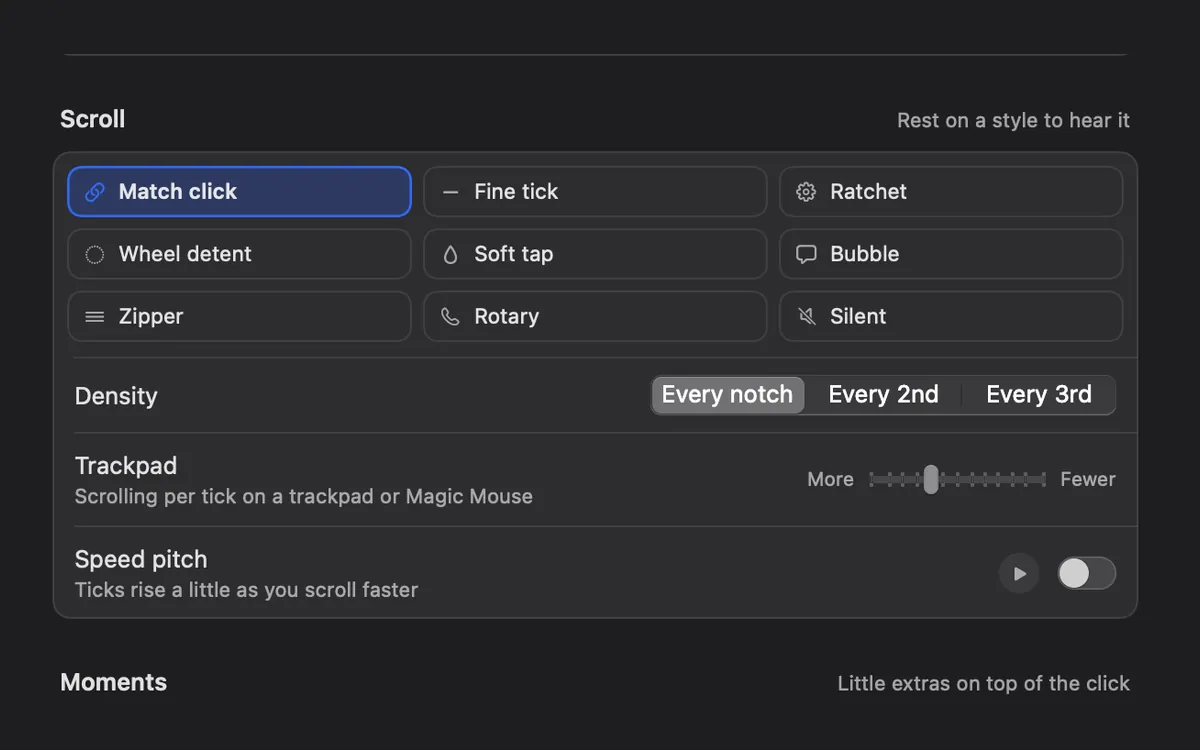
Clacky’s Scroll Ticks give every scroll notch a soft tick in 8 styles: Fine tick, Ratchet, Wheel detent, Soft tap, Bubble, Zipper, Rotary and Silent. Match click uses the tick that belongs to your click sound. Density plays a tick every notch, every 2nd or every 3rd, the Trackpad slider sets how much scrolling plays a tick on a trackpad or Magic Mouse, and Speed pitch makes ticks rise a little as you scroll faster.
On top of that you get 37 click sounds for every press and release, 29 keyboard sounds, a ripple on every click and a screen recorder. Keyboard sounds listen for key down/up only. Clacky never records, stores or sends which keys you type, and respects Secure Input.
- You want your clicks and typing to sound good too.
- Your Mac runs macOS 13 Ventura.
- You want to try it free first.
Setting up each one
If you run both, turn Scroll Ticks off in Clacky (it has its own switch and a Scroll chip in the Clacky menu) so the two don’t tick at once.
- Snick: download and unzip Snick.zip, drag Snick.app to Applications, open it, allow it under System Settings → Privacy & Security → Accessibility, relaunch, and paste your licence key into its menu.
- Clacky: download it from clacky.app, open it, allow Input Monitoring, then open Settings → Sounds → More options to pick a scroll style.
Where these facts come from
Checked on 5 November 2026. Prices are in US dollars, before tax. Apps change, so check each page before you buy.
Snick’s site doesn’t name its maker or list a price. It sells a licence key that unlocks the app.
- Snick: snick.vercel.app
- Clacky: scroll wheel sound and privacy
Questions
Does Snick work with a mouse scroll wheel?
Why does Snick need Accessibility?
Can I turn off scroll sounds in Clacky but keep clicks?
Facts checked on 5 November 2026.
Related
- Scroll wheel sound on MacAdd a soft tick for every scroll-wheel notch on your Mac, in 8 scroll styles, with a setting for trackpads and Magic Mouse.
- Scroll TicksA soft tick for every notch of the scroll wheel, in 8 scroll styles.
- Click SoundsA satisfying click for every press and release of your mouse or trackpad: 37 sounds in 8 families, from Arena to Spooky.
- Can my Mac make a sound when I click?macOS has no setting for a mouse or trackpad click sound. How to add one with an app, what the Input Monitoring permission allows, and the steps.
- Does Clacky work with a Magic Mouse and Magic Trackpad?Yes. Clacky plays a click for every press and tap on a Magic Mouse or trackpad, and soft scroll ticks you can tune for smooth scrolling.
- Does Clacky play a sound when I click the trackpad?Yes. Clacky plays a click for every press and release of your trackpad, tap to click included, in every app. 37 click sounds, plus scroll ticks.
Make something on your Mac today.
3 days free, every feature. Then $4.99 once.